
 Overview in the football manager – guide
This guide explains the “Overview” screen in Gaffer's Desk, the free football manager in your browser. Your home screen with the essentials at a glance.
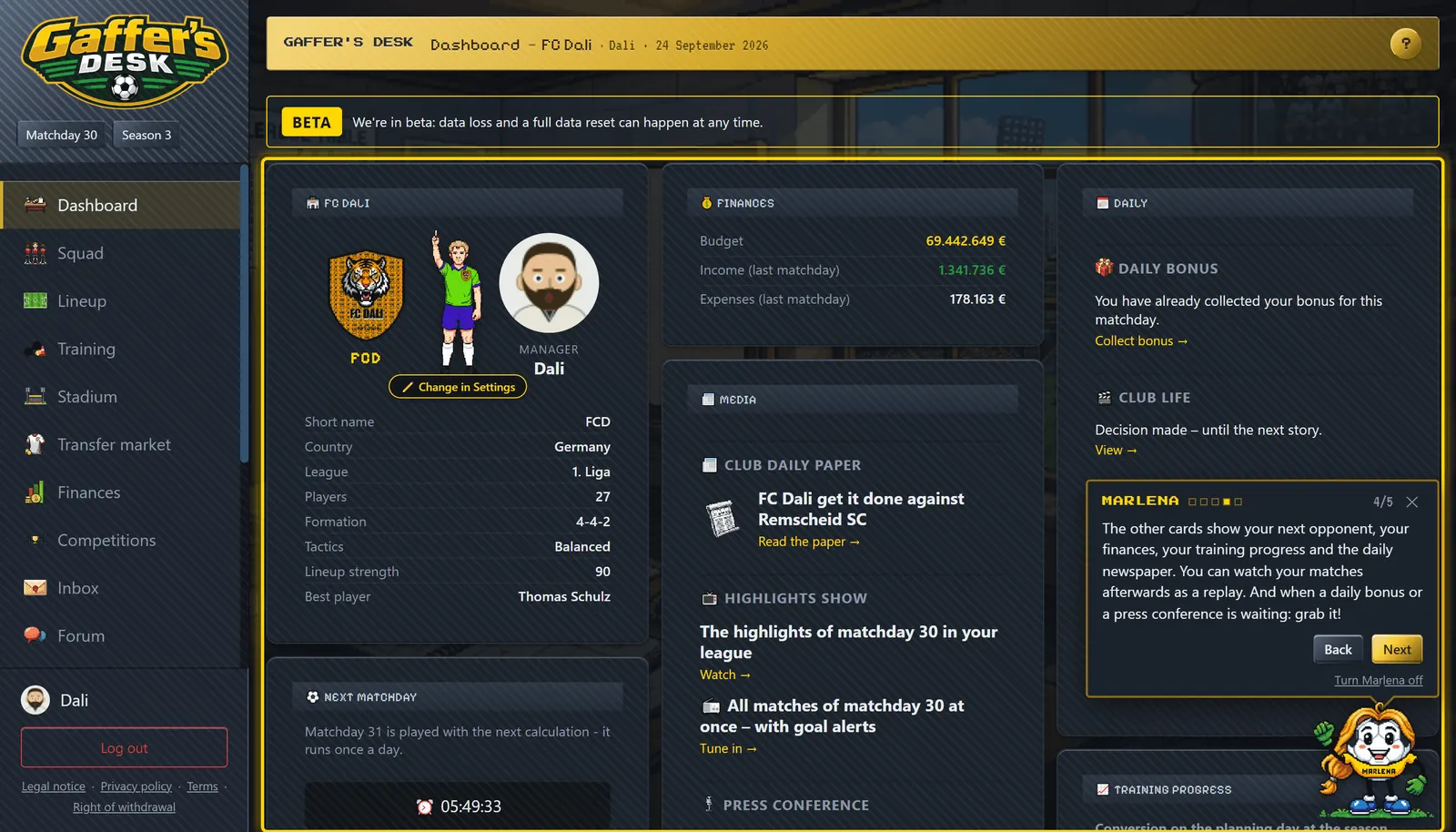
Good to know
- Matchday and season are shown at the top and in the sidebar.
- "Next match" shows your upcoming opponent, "Recently played" the latest results with a replay button.
- The finance tile shows your budget plus last matchday’s income and expenses.
- "Training progress" shows when full training and experience points are converted to strength (matchday 9, 18, 27) and how many players are close to it.
- The daily paper sums up the matchday from your club’s point of view.
- Player and club names are clickable throughout the app and open an info overlay; crests, profile pictures and flags show it on mouse-over.
- Under "Daily" you'll find the daily bonus, club life, the press conference and revealing your trading card - once per matchday.
- Under "Media" are the newspaper, the highlights show of the matchday and the round-up where all matches run at once.
- Your next match shows the weather at the venue. Rain, snow, wind and heat affect the game - and the crowd under open stands.
- The board goal tells you what the board expects this season. Reach it and you get a bonus.
Change history
New: squad posters and share cards. Results, tables, titles and your stadium can be shared as images.
Try it yourself: found your club for free in your browser.
Play for free